obsidian says this takes 11 minutes to read.
look at the page updates here.
Unlike books, or physical pictures or media, digital data seems to be pretty weirdly ephemeral. Most storage mediums only last 10 years or so, optical media can last hundreds of years, but most die with in the first couple of years. People have tried to create mediums that can last longer, but what ends up happening is that the hardware these rely on often fail, or the software required is lost. The internet also is ephemeral as well. Stuff shows up and then disappear without a trace. Accounts and posts show up and go away as fast as they show up. YouTube is like an example of this. Sometimes videos get posted on the platform, and then they get immediately deleted. Be it for copyright reasons or something else. There has been times I tried searching for a specific video that I remember watching when I was younger, that got deleted as time went on, maybe because the creator decided to delete that video for various reasons. Or like, maybe it is because it got copyrighted, or it is a video from back then when Youtube sorta allowed you to use copyrighted music, and now it is gone because of the copyright holders were afraid of losing 3 cents or something.
I been thinking of building a library of videos for me to keep. I think the thing that got me started with the project is with the recent change to a certain video due to copyright, the video is called “Fear of Cold” by Jacob Geller, and it is among my favorite videos of all time. However, a recent copyright claim forced Jacob to remove 2 minutes from the video, because that section used a soundtrack from a videogame, and the copyright holders had an issue with that.
This made me realize there is a real possibility that more and more videos may be affected by this, and there has been times where I find videos where sections of the video are silent, often done to avoid the copyright claim. Another video that got removed that I remember seeing (and downloading) is a video from the guy behind Obtainium (his channel here). The video was basically a how-to guide on running pirated Windows games on Linux, essentially a guide on how to get this fully set up. The video lasted 7 months before being taken down, and well, the creator had to upload a censored version where any parts referring to obtaining games without DRM was removed. The video is still up, but it is unfortunately censored.
getting started with the project, and handbrake stuff

I’ve been working on a project, which is to download most, if not all, videos on my favorite videos playlist on Freetube (and like, generally download videos that I really like). The intention is basically to build a sorta local video backup for stuff that I like, and sort them out. Then these videos are hosted via Jellyfin, which is also in my personal server. However I don’t have a lot of storage, which means in order to store these videos, I pretty much need to compress them down with Handbrake, which is tricky to do really. The server also doesn’t have any dedicated hardware for decoding, which means that all of it is handled by the integrated graphics which can handle 1080p, but are not great at handing anything else. The settings I found to be decent for Handbrake are the following:
also, handbrake allowed me to export the preset i made, so uhh here you go i guess? here it is here.
On the summary tab:
-
format: mp4
-
following options checked: web optmized, and passthru common metadata
On the Dimensions tab:
-
resolution limit is set to 1080p
-
anamorphic is set to checked
-
optimal size is set to checked
-
everything else is left to be as-is
Filters:
- the denoise option is set to hqdn3d, with the light preset
On the video tab:
-
video encoder is h265 (nvenc)
-
framerate is set to be same as source (with the variable framerate selected)
-
color range: limited
-
the quality slider is set to 35. Not great, but the videos look good enough to my eye, so you may want to set a lower value.
Audio, Subtitles, Chapters tab: On the default settings, no changes made.
The time to transcode certain videos depends on the length and size of these. Longer videos will take a longer time to transcode, even using the GPU’s hardware NVENC decoders. A lot of these settings were set via trial and error, and I found out that occasionally, reencoding certain videos resulted in a larger file. So I ended up tweaking the settings, and I found a pretty decent set of options that I use. With my settings, on my devices that I own, the video seems “fine” to my eye, and maybe there are better settings out there, but for now this would be enough for now.
yt-dlp

The way I download vides from Youtube is with YT-DLP. I like this little program and it runs pretty much on everything. I was trying to find a way to “enhance” the downloading experience, and I wanted to have stuff like subtitles, and metadata from the videos themselves. I spent a couple hours using the command line and I was able to find the best settings for what I wanted. So I ended up with this command with certain settings selected and configured. Here is this following command:
yt-dlp --write-subs --sub-lang en --embed-subs --embed-metadata --embed-thumbnail --cookies "cookies-www-youtube-com.txt" --sponsorblock-remove sponsor --sponsorblock-mark all "https://www.youtube.com/watch?v=dQw4w9WgXcQ"
So what this command does is to:
--write-subs --sub-lang en --embed-subs: this should
write the subtitles (if any) to a subtitle file (from what I can tell,
it downloads it as a .vtt file). I couldn’t find any way to make YT-DLP
embed these inside the video file, so this is the second best option.
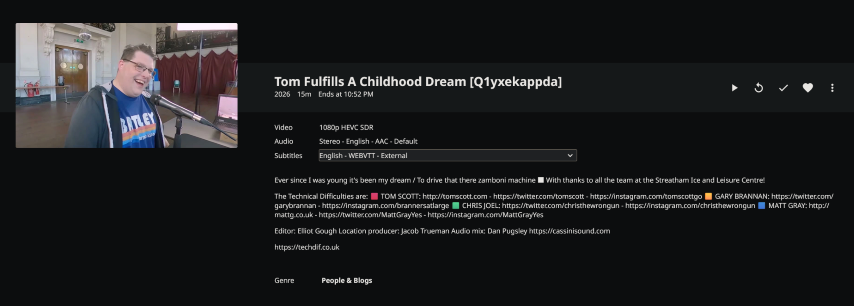
For Youtubers that actually put work in their subtitles (pretty much
only Tom Scott, lmao), it also displays the colors, font formatting, and
other special fonts on VLC, but on Jellyfin these are sadly absent.


--embed-metadata --embed-thumbnail: these two commands
should embed the Youtube description data inside the video itself, it
ads the required information inside the actual metadata of the video
file and it works surprisingly great, and Jellyfin is able to return
this information and display it on the playback window.
--cookies "cookies-www-youtube-com.txt": this command is
to basically prevent Youtube from stopping any downloads from rate
limiting. The cookies file is basically a backup I made using this
extension here,
and after I save these cookies, I pretty much point YT-DLP to use these
cookies instead. For whatever reason, these do not work for downloading
age-restricted videos, but it is supposed to work. Maybe I need to add them directly
to the YT-DLP config files or something.
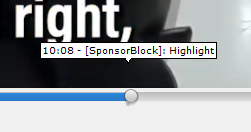
--sponsorblock-remove sponsor --sponsorblock-mark all:
this command should remove any sponsors from the video (like remove them
fully from the video completely)1 and also mark any other sections from
the video (for example: highlights, unpaid sponsors, tangents,
filler/jokes, etc.).
Other commands I sometimes use: -P "folder" downloads
them to a certain folder. Another thing that you can do is to make a
list of videos from a list somewhere, and then add these to a .txt file.
Add the argument -a filename.txt to download a bunch of
videos from a set list of Youtube URLs. I also sometimes use
-o "%(channel)s - %(title)s [%(id)s].%(ext)s" to format the
naming for the videos, so it can be something like
youtuber name - video title [youtubevideoid].mkv. This
should make it easier with organizing, since I should be able to see the
person who made the video right away.
A thing I want to do is to make some sort of program that runs on my server that can automatically transcode video that is in a certain folder, and then place them in another folder where they will wait to be sorted out by me. From what I do know, all Handbrake is, is like a bunch of libraries that are bundled together in a single program. For now, however, this is only really an idea because the server does not have any dedicated hardware for video decoding, and doing this on the CPU may take literal days.
video playback


Anyways, now with the videos downloaded and compressed, I guess it is time to explain how these are sorted out. Videos ideally are sorted out by creator, with their name, but sometimes I will group them in one folder (like Dankpods, The Drum Thing, and Garbage Time are inside a folder called “The Trash Network”). Videos that are basically one off videos are sorted in a series of folders where these are separated by topic, for example, there is one for like gaming and streaming clips, another one for voice acting shitposts (think videos from Gianni Matragrano), another one for various videos about Voices of the Void, and many other folders among those lines.
The way I would watch these videos is by either using Jellyfin from the browser from my PC, on the Jellyfin app from my phone, or simply playing the video from the file explorer in like a player like VLC. Going back to the app on the phone for a moment, the built-in default media player for Jellyfin doesn’t always work the best (also does not support basic Android features, such as background play, as well as Picture in Picture mode), so the best way to play these videos, as I found out, is to make the Jellyfin app to forward the video to VLC. VLC works great for this purpose, however from what I can tell, it sadly does not support video queuing in this mode. Jellyfin also has a Exoplayer2 version of the player that you can choose if you want, but this kinda doesn’t work all the time, I found some videos where the video goes blank, but the audio keeps playing, which kinda sucks.
The future of this project is basically me getting a GPU for the server, maybe a dedicated Intel Arc card (or the RTX 2060 whenever I decide to upgrade the GPU on this main PC), and then move the downloading and transcoding duties from my main PC to the server or something. I want to get into scripting, make a sorta script that checks a txt file every couple days, and if it has been updated, it will start the process, first it will download these files to the drive, then it will transcode them to be smaller, and finally, I want the script or program or whatever to move these files to the corresponding folder, for example, if I add some Tom Scott videos on there, I want this program to first download the videos, and then to move these videos to the respective Tom Scott folder. I also kinda want to make this in C# somehow too.
is this all worth it at the end?
I don’t know. I did this because I wanted to have a backup of videos that I enjoy. I like being able to go back to old videos that I enjoy and not being fucked over by Google’s bullshit sign-in requirements. Jellyfin works on everything, my phone, my PC, and pretty much any device that is connected to either the tailnet or on my local network.
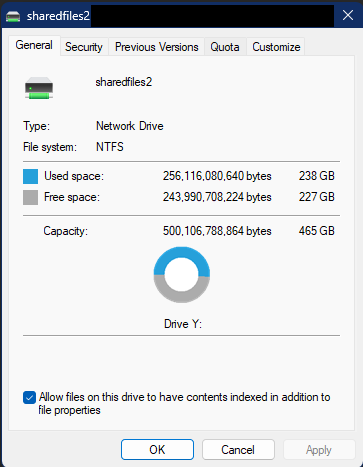
I do have some plans I want to do in the future. I want to get more storage, maybe get some RAID going just to be sure that in the event a drive dies, the most that would happen is a slight annoyance. I want to add some hardware acceleration, so Jellyfin is able to decode these videos without much trouble.
I kinda want to start all over again. This time, with all the hindsight, I will know to not use stock Fedora KDE, instead I may use something like Ubuntu Server, or even something lile TruNAS. This time around, I could go ahead and configure Jellyfin and other services inside a Docker container. Maybe add some sort of script that checks a series of channels every couple days, and then downloads all the newest videos, and then it transcodes them automatically and then drop them into their respective folders. All of this is nothing but planning, and maybe in the future I would be able to do this. Only time can tell.
addendum:
So turns out that YT-DLP was actually downloading videos in a much higher resolution, usually 4K, and I didn't know this. I decided to force YT-DLP to download in 1080p with the option `-S res:1080`, and it seems there are more options on regards on what codec to use too. I guess I will experiment with this later, as soon as I can.
Also turns out that for videos that are already 1080p, Handbrake's compression turns out to be pretty redundant. Sometimes, it produces videos that are larger than the original file, which is annoying, however most of the time, the videos that would be on the output would be somewhat like 80% or 90% of the size of the original file, which uhh, not worth it lmao.
So turns out this was for nothing at the end. But hey, at least I am learning on how to use Handbrake and YT-DLP, so yeahh.
updates
- 2026-06-12: added notes regarding yt-dlp.
- 2026-06-11: page was created.