obsidian says this takes 47 minutes to read.
take a look at the page updates here
Also holy shit, this is the longest post that I ever written, ever lmao. Originally this was supposed to be a quick update on the fact I wasn’t using Linux anymore, but it then spiraled into a long kinda rant about Linux, and the various frustrations that I had during my time using Linux for like, something like 5 months on a daily basis. Keep in mind that this rant does not mean I hate Linux, in fact, I do like it quite a lot, but it is more intended as a way for me to go ahead and just talk about the issues that I personally had while using it.
an introduction of sorts
I been trying to switch to Linux for a long time for a while, and got to admit, this time has been the closest I have reached to fully going all in on Linux. However with getting a job recently, and being overwhelmed by the everything™ happening around me, I felt the need to start “simplifying” stuff like tech or whatever. And Linux didn’t help. Ideally my computer experience should’ve as seamless as possible. My computing experience ideally should be easy, like I should be able to get home from a long day, boot up my computer, and play whatever game I wanted to play, or spend time listening to music, or just watch videos on there without having to deal with any issues that may crop up. I expect my computer to not crash, to properly boot up, to work. And like, I realized that my Linux experience was one of frustration and trying to figure out random issues that I never expected having at all. Issues like updating and hoping it doesn’t break my system. Wanting to play a game, only to find that the game runs poorly on Linux with Proton. Dealing with constant suspend issues on my laptop, and dealing with Wayland fuckery on my main PC. It is honestly a load of stress that I really really don’t need right now. I remember one night I was thinking if this was even worth it. Like sure, I am leaving Windows behind, but what am I losing? Peace and tranquility of being sure that my system actually works? Access to certain pieces of software that aren’t available on Linux and that I been using for years? And that night I decided to just go back to Windows, and kinda gave up on the whole Linux thing.
I been wanting to talk about this for a long while now. In fact, this is a mish-mash of writing from a earlier doc that I wrote a while ago now, which was something over 10000 words long and took 51 minutes to read, mixed up with more and better thoughts and feelings regarding this. I ended up leaving that unfinished, because it was too much rambling. And welp, this post is taking parts of that old doc that I left unfinished, and combining this to what you see here. And because of the length of this whole fucking post, I will leave a jump list below so you are able to jump to whatever section you may want to read.
sections
“the devil you know”
I gotta admit, I am one of those people that dislike change when it comes to tech stuff. And while KDE does a lot to soften the ice cold plunge that Linux gives you when starting out, I think that the various small differences on how Linux works starts to get to you. You remember ever so often that Linux doesn’t have app X, Y or Z, and the only real way to get these Windows only programs running is via WINE, that one very unreliable emulator that is not an emulator that works, but you then have awkward issues like certain window elements not working or parts of apps not showing up or having strange glitches or outright crashes because the app is not being run on Windows.
Other times, its the fact that you need the terminal to change a lot of settings on Linux. And sure, there is the GUI portion or Linux, but what you have available is a small fraction compared to everything you can change on Linux. And don’t get me wrong, I eventually got used to the terminal, even being able to navigate and do stuff with it, but I never really got comfortable using it. My experience with the terminal usually is the following:
-
have issue that you cannot figure it out
-
go into forums and reddit posts trying to figure it out said issue
-
find post that sounds similar to the problem you are having, find commands that may fix everything
-
run the commands, hope to god it doesn’t break anything
-
is it fixed? then congrats! if not? oh well…
To me, using the terminal felt that I was always one command away from ruining my system.1 Leaving it unbootable. Breaking x thing. Like the time I tried getting a fingerprint reader working on Linux, and ended up locking myself out of my computer. I am pretty sure there are other times, where I gone ahead and broke my system in interesting ways. I remember this other time, I was using ElementaryOS, and I was trying to get the status indicators working in the system tray. Long story short: yeah I pretty much broke my system somehow.
I used Windows for pretty much most of my life, and I think it is pretty hard to just switch to a different environment like Linux. With Windows I am pretty much sure of what it can and cannot do. If you have used something for a long time, you can kinda get a feel of when it will crash and when it will run smoothly, if that even makes sense. So with a new OS, you don’t know what will happen if you do X thing to the OS. Like maybe it will explode, or maybe nothing will happen. And unlike Windows, there is no “oops” switch that you can hit. Nothing like System Restore or whatever it is called, unless you use a distro that has something similar to it, like Mint and its Timeshift thing. And sure, I been using Linux on and off for like, 8 years now, but it never was like a permanent thing. It was more of a curiosity, just to see how it all was. Trying Linux a couple times a year is very different from actually daily driving it, which was something I learned the hard way, lmao.
i wanted something that just works
I want something that works, and while Linux gets very close to that,
it often stumbles in places that makes me really worried that something
will happen and it’ll break out of nowhere. Like I remember getting
strange glitches related to Wayland, and while they are minor, they are
still very annoying to see. My trackpad on my laptop would for some
reason ignore my scrolling for a bit and then just resume scrolling,
which was something that did not happen on Windows. For a while, the
taskbar in Plasma would freeze after waking back up from sleep, and to
unfreeze it, I basically had to kill the plasmashell
process. On my laptop, I battled on and on with sleep issues, and other
annoying quirks that are sadly are to be expected on Linux, especially
on laptops. I also heard about the many issues like people’s computers
becoming unbootable because of a change somewhere down the line in the
update stack, which required the user to get a boot USB and manually fix
the boot drive. I also remember being unable to fully update my system
because a broken package was pushed out in the update cycle.2 I also remember another issue when
running the Filen desktop app: Dolphin, the file browser on KDE Plasma,
for some reason would freeze for half a minute on start-up and would
only fix itself after fully closing Flien (or disabling the Network
Drive setting which maps a folder (a drive letter on Windows) as a
virtual drive).
Flatpak, this supposedly one-size-fits-all packaging format, often had issues with some programs just deciding to not work anymore. I was left without access to my authenticator program for 2 weeks, which I ended up replacing with the regular RPM version. And the way that crashed was truly interesting. There was no error window, which on Linux often meant that there is something written to a log somewhere. So now you need to try opening the program via the command line, and if you’re lucky, your issue will be right there, printed out. Except that the error printed out is not likely to help you at all, since it was a bunch of programmer mumbo jumbo anyways. In other apps, drag and drop was a no-go on Wayland, and in apps where I often drag and drop to, like Discord, also didn’t work, apparently because Electron itself don’t support drag and drop on Wayland for some reason, especially if they’re Flatpak packages.3 Theming on Flatpak programs is super inconsistent4, the Flatpak version of Steam just doesn’t work as you’d expect it to (apparently it has a lot of trouble seeing secondary drives), the Flatpak version of Signal also doesn’t store messages encrypted unless you finagle with the Flatpak configs (which imo is not a thing that I should be even dealing with at all), the Flatpak version of Element, that Matrix chat app, also struggles to access the keystore on the OS, which means if you decide to use it this way, you may just end up storing messages without encryption…5 And sure, Flatseal exists, but like, you still need to test and retest to see if everything worked properly at all after changing those settings, which is something I am not willing to deal with anymore. I don’t really want to search and find the obscure portal thing that X program needs so it can access Y part of the operating system. And I don’t want to deal with unexpected issues with my programs not working because I changed a single setting and forgot to revert it. Or find that a program that I trusted was secretly storing my information in fucking plaintext because the Flatpak app couldn’t reach the keystore, ffs.
I suppose the most frustrating thing about these issues with Flatpak programs is that sometimes, these are often the only version that you can actually get your hands on, on a distro that is not Debian or Ubuntu. So you are expected to use a packaging format that kinda just sucks sometimes, and the only alternative is to do some unholy shit and get APT installed on Fedora or whatever, or maybe Distrobox could’ve worked. But that would’ve added even more complexity to the system, which was something I wanted to avoid in the first place.
It always seemed that programs on Linux crashed more often compared to what you’d see with their Windows versions. Stuff like Krita, or Onlyoffice sometimes crashed when working with complex documents, and other times, would slow down to a crawl. Another thing that I remember people going on about with Linux, is that you don’t really need to worry about an update being shit, or adding bloatware like how it happens on Windows. But on Linux, updating kinda is like spinning a wheel, and if it lands on a certain spot, you get shot. And something stops working. Or your system breaks. Or your NVIDIA drivers get nuked and now you have to search the damn commands for RPMFusion because Fedora handles drivers differently. Or something else happens that forces me to stop working on the thing I was doing and put my attention into fixing said thing. And I really can’t trust Linux to not break itself. I remember I was trying to uninstall a package that I installed earlier (i think it was Bottles) that was installed as an RPM package, yet I never did because it told me it would uninstall other 30 packages for no reason, and I was like “hey hold the fuck up fuck you mean you’re uninstalling the flac packages?????”.6
And there is also the fact that peripherals working on Linux is either a hit or a miss. My drawing tablet, a crappy Huion Inspiroy H640P, works half of the time on Linux, and while everything works for the most part (don’t remember if the pen pressure worked however), when running KDE Plasma, if I drag the cursor too close to the taskbar while drawing something, it can accidently get stuck on the taskbar, and now I need to lift my hand off the tablet to my mouse and click back into the canvas. That perfect line that I was drawing? Ruined.
I suppose there is also the side of wanting to buy cool peripherals and then finding out these only work on Windows. For example, most capture cards only work on Windows. I once wanted a Stream Deck for shortcuts and then found out these only really work on Windows.7. Most drawing tablets will only really fully support Windows or macOS. The RGB in my keyboard only works with the software that runs on Windows, the RGB on my mouse, yep, only Windows8, and so on and so forth.
I once got locked out of my Linux partition because of some fuckery that I tried, which was trying to get a fingerprint reader working. This fingerprint reader doesn’t like Linux like at all, and even if the system gives me the chance to scan a fingerprint, it will never work afterwards. I found some tutorial that I ended up following, which involved editing the PAM files, which is the main way Linux authenticates passwords and other very important system authentication stuff that it is way too technical for me to even understand. So this file is responsible for a whole lot, which means it is very important to like, not fuck the file up. And I fucked the file up. Which meant that my system was now asking for a fingerprint from a fingerprint reader that did not work. I ended up booting a live USB OS to access the locked system to fix this issue, which worked, but it was a major pain in the ass. And it is kinda nerve-racking, right? The fact that you can easily shoot yourself in the foot and you wouldn’t know until you reboot and find out what the thing you did. The fact that there is oops switch anywhere, which means anything you do wrong is on you and only you.
Ultimately, I really just don’t have time to deal with the annoyances of Linux, and I just wanted something that works. I wanted something that didn’t decide to uninstall its own graphics driver at boot. I wanted something where I can play games without having to go though the trouble of, well, troubleshooting, or having to triple check ProtonDB just to make sure that it does run on Linux. I want an OS where I can just sit down, open Cities Skylines and just play, and not see my whole computer freezing because a mod wasn’t vibing with Linux. I wanted an OS that had packaging formats that actually worked, and didn’t have weird little issues like how Flatpak has. I wanted an OS that can run on my laptop and have working sleep mode, instead of having to fuck around with the GRUB config every time an update broke sleeping again. Speaking about sleep mode issues…
“damn, wake up from suspend issues have hands”
Linux almost always has drivers for almost anything you have. That is, until you get to laptops. Laptops do not conform to any written standards or protocols. Most laptops are strictly designed for Windows and Windows only.
Installing Linux on a laptop either goes two ways:
-
everything works! congrats! you are lucky enough to either have a Thinkpad, Framework or just lucked out that the manufacturer did all the right choices by choosing off the shelf components, and also didn’t do any specific fuckery to the BIOS.
-
Something is broken. The Wi-Fi is broken. Suspend doesn’t work. Audio doesn’t function, or something else entirely. In this case, the only way you may be able to fix it is going deep into whatever search engine that you prefer, or on various Linux forums, and if you’re lucky, you might find your answer written in a Arch Linux forum post or wiki entry, reddit post or inside a GitHub repository where some poor soul already did all the hard work for you, into making the device work again. You follow the instructions mentioned there, and your device works or may not work. Who knows.
So I made a mistake. The laptop I purchased almost three years ago is the dreadful HP Victus. To be fair, it is a decent laptop (hardware wise, at least) that HP managed to fit inside the worst feeling case of all time. It feels so cheap and flexes so much. It was also not designed to run Linux (hell, it doesn’t even have Windows 10 drivers at all). Despite of this, I pretty much forced it to run Linux, and after an hour I had a desktop ready and everything was working. Except not really.
So let me tell you the horror story of a demon called Modern Sleep. During the Windows 8 era, Microsoft really wanted computers to behave more like phones and tablets. To be able to do this, Modern Standby was introduced. Its original intention was to “improve battery life” and allow for faster resume times, to make it similar to how a phone works. However, this created a mess of weird, stupid configurations that laptops started to be really affected by. There have been so many stories of people putting their laptops to sleep, and then putting it away inside a bag, only for it to end up stuck trying to do updates while asleep for some reason, or just simply waking up somehow, burning battery and making the laptop very hot since it is, of course, inside a bag.9 To make stuff worse, many laptop venders decide to remove all other sleep modes (S3 being the normal kind of sleep), which while on Windows this is not a big issue, but on Linux however, we end up encountering so many issues with sleep. And guess what my laptop has for sleep modes? Only modern standby apparently, yay!
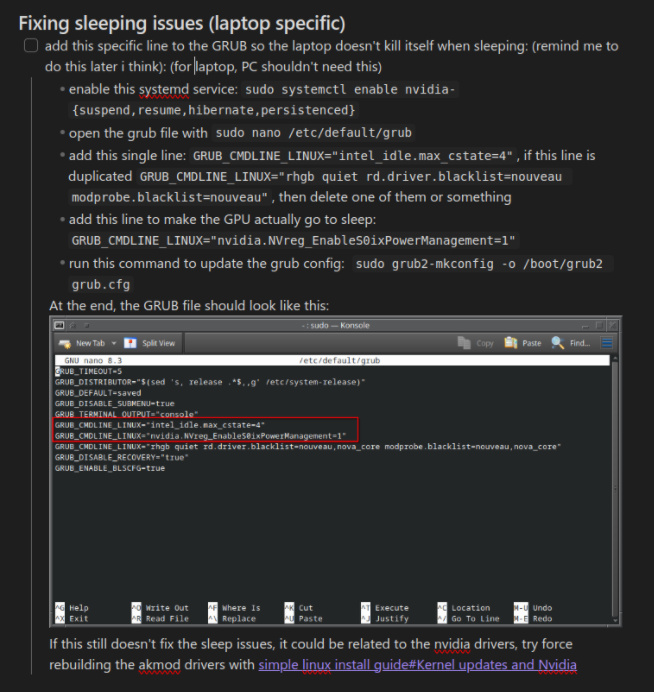
On this laptop, if I try making it go to sleep, this would happen:
-
the laptop goes to sleep normally, but when waking up, the system freezes, and the screen will alternate between display turning on, displaying some errors, and then turning itself off.
-
the laptop doesn’t go to sleep, instead it will turn off the screen for a couple seconds, wake itself up again, and then go back to the lock screen like nothing happened.
-
the laptop actually goes to sleep, and ends up waking up, with no explanation whatsoever.
Fixing this was not fun at all. It involved a lot of forum scouring, wiki surfing, fucking around with boot arguments, and blood, sweat and tears. Finally, I managed to get a semblance of a working sleep mode, but of course with anything Linux, nothing is perfect. Lets see why:
-
sometimes, the laptop does go to sleep, but keeps the GPU on for some reason. The fans sometimes remain on, or the fans will stay off, in turn, making the laptop very hot.
-
charging while in sleep mode will turn on the fans. Not sure if this is intended behavior, or a bug present with Linux, or the laptop’s firmware. When in this mode, trying to wake it up from sleep would either cause it to enter the previously described issue above (screen turns on and off), or will just. wake up. without issue.
My breaking point was the time I finally had everything fixed, and then an update happened. And back to square one. But this time, no amount of GRUB arguments, no amount of forum surfing, or searching in DuckDuckGo, nothing helped me. So I just gave up, and reinstalled Windows. So I guess there’s that.
x11 sucks and wayland also sucks but slightly less
During the time I used X11, I had so many issues with it, especially with my multiple monitor setup. I had so many issues, like games not running at the screen refresh rate because something was preventing it to do so (I never figured this out). The operating system lagging out because something down the graphics pipeline was fucking up. Trying to set Nvidia X Server settings that some guy on Reddit said it made their X11 experience better, for it to fail. Using GNOME or KDE Plasma on X11 was a laggy mess that made my PC feel like a underpowered laptop. Why is window dragging on X11 on GNOME so slow? Why is it so choppy on Plasma? Fucking hell. And the worst part is the gaslighting. People saying that X11 works just fine on Nvidia. That they actually prefer X11 and would never switch to Wayland. I was trying everything to get it work. I scoured through forum posts, Reddit threads, I did web searches. None of this ever helped.
So enter Wayland. It saved me from the horrors of dealing with X11, its laggy animations, inconsistent performance, as well the many security holes that X11 had. My Linux desktop finally felt like an actual computer, running at the monitor’s exact refresh rate (or at least near it this time), and with no screen tearing or anything of that sort. In the classic spirit of Linux however, you cannot have your cake and eat it too. Wayland will feel great for the most part, and then a single ugly issue will show up to ruin your day. Random stuttering, issues with games, random black screens, random glitches in Electron apps, all of these issues contribute to the frustration that I had while using Linux.
security issues with Linux?
While I was using Linux, I ended up stumbling across a couple of blogposts from a “security researcher” called madaidan. He goes on to say that Linux is insecure by design, that the kernel lacks many of the mitigation systems that Windows and MacOS offer, that vulnerabilities are common and attack surface being “big”, saying that systemd is unsafe and should not be used, arguing that Linux has no Rust development, that Linux is written in unsafe code, among a somewhat long list of issues that Linux has which makes it look really bad. I must admit, a good chunk of the post was wayyy too technical for me to even understand what is happening, so as to understand this a bit more, I decided to just research it myself to see if it was actually true or not, and well, I ended up falling into a rabbithole that felt like it was bottomless.
Trying to find a clear answer regarding this left me even more frustrated. While researching this, I ended up finding so many guides on how to harden Linux security-wise, or posts without any proof that Linux was so much more secure compared to Windows or vice versa. They said that “oh Linux is safe because open source!” and other stuff that didn’t really fill me with assuredness. And the guides were like, a list of commands that you can run to make stuff safe (supposedly). Most of these guides often don’t explain in detail at all what they do, the only thing that is certain however, is that if you run x command, you would end up safer, without telling you it will end up breaking shit. And distros like SecureBlue are (supposedly) trying to make stuff safer, but they break half of your programs because of these same changes, and like, to get these programs working, basically consists on undoing the hardening.
I think the worst part is that I can’t seem to find a more mainstream publication talking about this supposed insecurity. Every blog post or Reddit comment regarding insecurity on Linux always point back to like, the same blog post and people mentioned earlier. Which is like, kinda strange? You’d think if Linux was this insecure as they claim, there would be more posts talking about this right? There would be more people sounding alarms right? More blogposts and news articles from actual tech outlets talking about this? Not just hundreds of random ass posts inside forums from people spamming the blog link and telling people it is not secure or something?
And to make matters worse, opinions regarding this change drastically compared to where you look. Most posts on forums like privacyguides.net or other “privacy oriented” forums paint Linux as this insecure (or, less secure, rather) operating system that lacks x, y, or z security features that Windows and MacOS has10, often never really explaining the real life implications of this (like how does the lack of these security features affect me in real life?), and they kinda make it sound like if you use Linux, you’re bound to get a virus or whatever. Other posts had a more doomer-ish tone, and there where many times where I saw comments from people telling others that “Linux is horribly insecure!”. More Linux oriented forums will tell you that it is more nuanced, since you can get a lot of security by tweaking with the system, by picking more secure distros (apparently Fedora is a good one in this regard), by tweaking SELinux and Apparmor11 to help seal up any cracks that Linux may have, or like they give you a guide that, again, is a list of things that you can do to supposedly lock down your system that is either written by some big corporation like IBM, Red Hat, or some security oriented company intended for corporations (kinda like this one here). But realistically, who has time for that? Like, I just want to play my games and shit, and to not worry about the insecurity horrors that apparently lurk in the shadows of Linux.
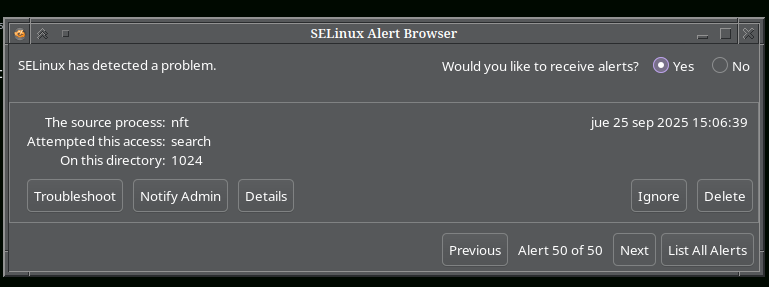
pov: you are using fedora
Supposedly, Fedora is the "best" when it comes to security on Linux, but like, while using it, I ended up getting a lot of these SELinux issues for some reason. Never really figured what they were, too.
I don’t like the idea of relying on security by obscurity because it is only a matter of time you get pwned by some rouge malware, or the idea of losing your files because a crypto locker was slipped in the repos, and there was nothing in the OS itself that could’ve stopped it. And the idea of using security focused distros like SecureBlue felt like it would a good idea until an update breaks it, and now you need to go and reinstall everything, again. I also don’t like the whole “use common sense” argument because you can do everything right, until the moment you just go be like “i think this should be fine” and bam! That is where you’ll get screwed. Or someone, somewhere slips in a piece of malware into the repo somewhere, which in that case, even if you do everything correctly, you’re still screwed.12
Maybe this doesn’t matter at all. Maybe the issues that this blog mentioned earlier are not a big deal for the average user, or don’t even apply to those who are regular desktop users like myself. Maybe the blog post was a fabrication, a lie, or maybe, I am worrying about this far too much. But like, what if it is true? The more I look down the rabbit hole, the more I am more confused and uncertain. It all fucking sucks. And being honest, I am already fucking stressed considering The Everything™ happening right now. I didn’t need another thing to worry right now.13
a rant on linux software
Before we start with this section, I should mention that most Linux software is great and awesome. But sometimes, you end up having some very specific needs for software, like software to control your GPU, and unfortunately, on Linux, these software pieces tend to be quite mediocre compared to something like MSI Afterburner or other Windows only software. In this section, I will also talk about music players, image and drawing tools, as well as office editors too.
gpu controller software
MSI Afterburner is something that I tend to use quite a lot, because my GPU has a pathetic little cooler on it, which sucks and constantly needs to be at 100% to have a chance of cooling anything. Unfortunately, it isn’t available at all on Linux, which means that you now need to find another alternative that may or may not work the way you want it to. And I found two alternatives, those being CoolerControl and GreenWithEnvy.
The first one was a very clunky mess. It was essentially a command line utility that was hooked up to a mini web server which itself was also hooked up to a browser frontend to provide the GUI portion of the app. It was clunky, and the experience was more frustrating than anything else. Nothing worked the way you’d expect it to, and even just setting the GPU fan to 100% (not applying any fan curves, just setting the fan to full blast) was far more work than what it was worth. Ultimately this was a painful experience, which makes MSI Afterburner, this really complicated program, look like it was more intuitive.
The second program, GreenWithEnvy, was also very frustrating to use. First off, it was a Flatpak program, which meant that more work was needed to get shit working, and to add salt to the wound, it was a GTK based program, which means that it’ll ignore theming on a KDE system, as well as look like a horrible ugly eyesore. And once everything was working right, the next update happened and now the program didn’t work anymore. I no longer had any sort of fan control, or control of anything regarding the graphics card. And this is genuinely very frustrating. After this happened, I pretty much gave up on trying to use programs like these, instead relying on NVIDIA’s old yet useful control panel on Linux. And I finally had working fan control that didn’t suck.
music players
For me, having a music player that can handle a library and have the ability to tag, rate, transcode and modify music files is something that I value a lot, and I think it is important. So for this, I use Musicbee as a music player on Windows. I really love Musicbee, as it has allowed me to organize my music, as well as listen to it and have a very fine grained control over my music library. I can rate, mark songs as “loved” and it would appear on my last.fm page, search by album, year, sort however the fuck I want, and other cool stuff that I now find essential when it comes to music players. I can also add themes, change layouts and other cool stuff to better make the music player fit my needs. In my personal opinion, Musicbee is among the best among Windows music players, and nothing else comes close to replacing it for me. But sadly, it is Windows only, and the developer has no intentions at all to do a port to Linux any time soon. So I guess it is time to find an alternative, but it seems that Linux music players just, generally kinda suck sadly.
I have tried so many music players on Linux: Strawberry, Clementine, Tauon, Harmonoid, JuK, Elisa, etc, etc, etc. So many of
them fail in the UI department, and lack functionality that I want.
Clementine and Strawberry for example look ugly, the colors for the
ratings are hard to see (why the fuck is it not just, yellow? or any
more visible color?), has no plugins, and has a design that is really
confusing. It also saves rating in a different format, which means all
my carefully selected song ratings were now gone and the only way to get
these back is to mass edit all the songs with the correct rating into
the tag that these two music players use, which is
FMPS_RATING.
On the other hand, it seems most music players on Linux try to
emulate the overly simplistic style of music players on Android. Stuff
like Lollypop and Amberol lack too many
features that I want that it makes me wonder, who are these players
actually for?
Another fatal mistake for music players on Linux is that they are often
very laggy and slow. Quod Libet is a
good example: It is an awesome music player, plagued with slow
performance across the app.
I should mention that I talked more about this on this previous post here, so if you want to listen to more Lug ranting for whatever reason, yeah go read that, perhaps.
editing and drawing tools
I really like Krita, and I think when it comes to its design, it is really decent. Until you want to add text. Text handing in Krita, for some reason, is really bad. On Medibang, you simply just draw the text tool to create a text field, and you’re done. In Krita, you can draw with the text tool too, which creates a new vector layer, and opens the text box window to start writing whatever you want. The moment that you try drawing another text box however, it creates it on the same layer. There is no issues right? That is, until you go and try to change the size of the new text: you suddenly find that you are changing all the text boxes at the same time, and of course, you are now frantically trying to CTRL - Z your way back to a semblance of normality.
office editors
LibreOffice is a good alternative for Microsoft Office, and it is really capable: able to handle 160 pages capable, which was the amount of pages my final college internship report had. To say this was done with a gun pointed at LibreOffice’s head would not be hyperbole: LibreOffice has some very interesting quirks, some of which made me have to figure out a workaround. Lets start off with image pasting. Word’s image pasting is really good. It works most of the time, and for the most part, Microsoft Office’s writer would often figure out the best way to paste the image without too much hassle. On LibreOffice however, pasting an image without messing up your formatting is really hard to do. I don’t know if there is a setting that changes this, or some other arcane knowledge that i need to figure out to fix this. All i know is that when i posted an image, the document had to be modified to make it look not broken again. Which is not a fun thing, especially on a 150 page report.
Spellchecking on LO is terrible. When writing in Spanish (which is a language I often have to write in), it often misses a lot of grammatical errors (like missing accents, question forms, sentence structures, and other stuff) that Word manages to catch perfectly. I ended up getting a third party tool called LanguageTool to get anything close to what Microsoft offered me in Word, and even then, LT was very instable, often crashing and refusing to work, which would require me to restart LibreOffice to get it to work again. Continuing on from spell checking, the way LO handles empty pages when typing is often really weird and annoying. Instead of deleting the white spaces, which is something Word, does, it decides to push everything downwards, ruining your carefully structured document, and making the images jump page somehow. Despite of this, I was able to finish my report without wanting to die too much.
proton is often oversold on what it can do
I should start off by saying that Proton is fucking awesome. I think the fact you can pretty much play every game without much hassle on Linux is amazing. And like, I vaguely remember this one video from LTT that was from 2016 with the title of “GAMING ON LINUX” or something like that, and the video just showcases Windows running in a VM, with a GPU passthrough, lmao. Now, it is real, no virtual machine or complex GPU passthrough or hyperspecific motherboards required. Just download Steam, change some settings and you have access to pretty much every single game you own, playable on Linux. Yet Proton is not perfect. You’re still like, emulating (kinda?) these games outside Windows, and when you do that, you end up seeing unexpected behaviors.
Many games have weird quirks and strange behavior when under Linux. Doom Eternal tends to lag randomly, DOOM 2016 meanwhile, crashes when I try to ALT - TAB to a different program window, Cities Skylines caused my whole computer to freeze because there was some fuckery going on with the mods, and it is kinda of a long list of issues that I had in games. Some small and probably easy to fix, others more larger and made the game unplayable if nothing was done about it.
The thing about Linux gaming is that Linux itself is kinda a computing leaning tower or Pisa: it has so many individual components that can malfunction at any time, and each part of the puzzle can cause issues when it comes to gaming. Before I stopped using Linux, my system had its display handled by the Wayland display server, meanwhile audio is handled by Pipewire, which in turn may or may not be making use of PulseAudio backwards compatibility. The game itself most likely is running inside a XWayland compatibility layer, which adds more complexity to the system. All of these small components can and will add some weird issues into the game. For example, I had issues of games only being stuck 60 fps on X11, or being stuck at the display’s refresh rate on Wayland even with VSync off. I had issues of screens going black when trying to play DOOM 2016 because something down the line didn’t like variable refresh rates, so I had to turn that off. For the longest time, Deep Rock Galactic has had issues with framerate, with the FPS randomly deciding to drop to very low levels, until something fixes itself and it goes back to its usual high framerate. This is honestly a lot of issues, that, for the average layperson, may try Linux and have a really bad experience on it. For me, I am somewhat willing to give troubleshooting a shot, but even I have my limits when to stop. Sometimes people just want to come home after a long day of work and hop on a game they have been playing for the past week. Sometimes they don’t want to deal with the potential bullshit Linux sometimes likes to dish out. They want something that will work all the time, and not just break out of nowhere.
And I must admit, Proton keeps getting better all the time. It was able to run every single game that I threw at it (with the exception of Cities Skylines) with flying colors. The framerate was sometimes as good as Windows, and in some games, it was even better compared to Windows. And if Valve can figure out a way to deal with anticheat without requiring kernel access, a small, simple when you just want to play yet complex if you really want it Steam Machine can work very well here for people who want to try PC gaming but do not want to deal with actually having a computer, or giving it maintenance.
Yet I worry because Valve seems to be the only company when it comes to gaming that somewhat cares about Linux, and by extension, developing Proton. I worry because one day Valve can decide to kill off Proton because it is not profitable enough, or it getting killed because some priority changed inside the company. And the only reason why Proton works so well is because Valve has pretty much been funneling money into the project. And sure, it may survive without funding for a while, it will still be a huge loss if Valve decided to abandon Proton completely. Fortunately, it doesn’t seem that will happen any time soon, at least.
gtk programs are everywhere and it refuses to integrate with anything
I should start off by saying that I don’t like GNOME at all. It feels like a toy, like macOS but with even more opiniated design choices, like removing the minimize and maximize button (because some GNOME dev was like “you can just use the left click menu and minimize it that way!”), or hiding the status indicators, indicators which are pretty much standard on every single operating system and desktop environment, but not on GNOME (or ElementaryOS) for some reason. Also, using GNOME and trying to get a usable experience is pretty much installing 10 extensions to try to get the DE to behave the way you want it to, like getting those status indicators back, or getting all your buttons on the windows back, or making the dock visible at all times and not only when you flick your mouse towards the activities hot corner. And all of this, to be broken next update, because GNOME decided to change something that broke every extension, and now you are back to square one.
This is why I really like KDE Plasma and the extent that you can theme everything on here. I love the small tagline that Plasma has: simple by default, powerful when needed. You can theme it, install widgets, extensions, plugins, whatever. You can make Plasma look as modern and sleek as modern macOS or as nostalgic as Windows 98 or Windows XP. I think my favorite theme on KDE Plasma was the Commonality Gris theme, and I combined this theme with an icon pack that I can’t seem to remember at this time, sadly, but it was pretty much an icon pack with the older style of icons that KDE used to have back in 2010 or so. I never had the chance to use classic CDE (the look that Commonality is trying to go with), but I did use Windows XP with the classic theme for a long while as a kid, and this brings me a lot of happy nostalgia since CDE and the Classic Windows theme do look very similar in places. There is something awesome about using this combination, it made me feel like it was 2002 and I was doing work on a workstation from the era, which kinda made using my computer much more fun compared to what a stock install of Windows 10 or 11 ever made me feel. Of course, this illusion lasts as long as all apps are willing to play ball with the theming, but of course, there is a subset of apps that just, don’t. And well, these are those apps based off the GTK framework.
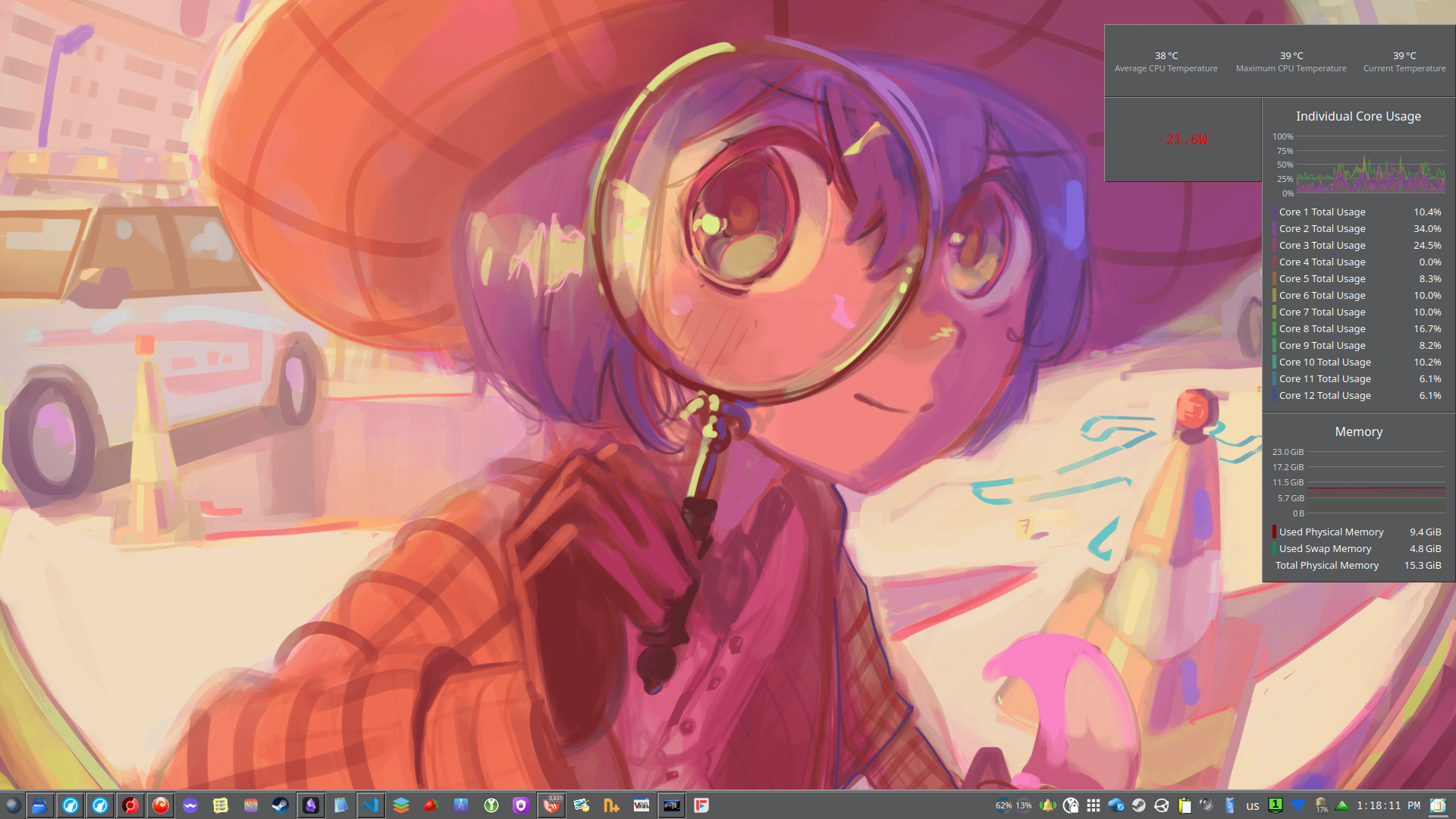
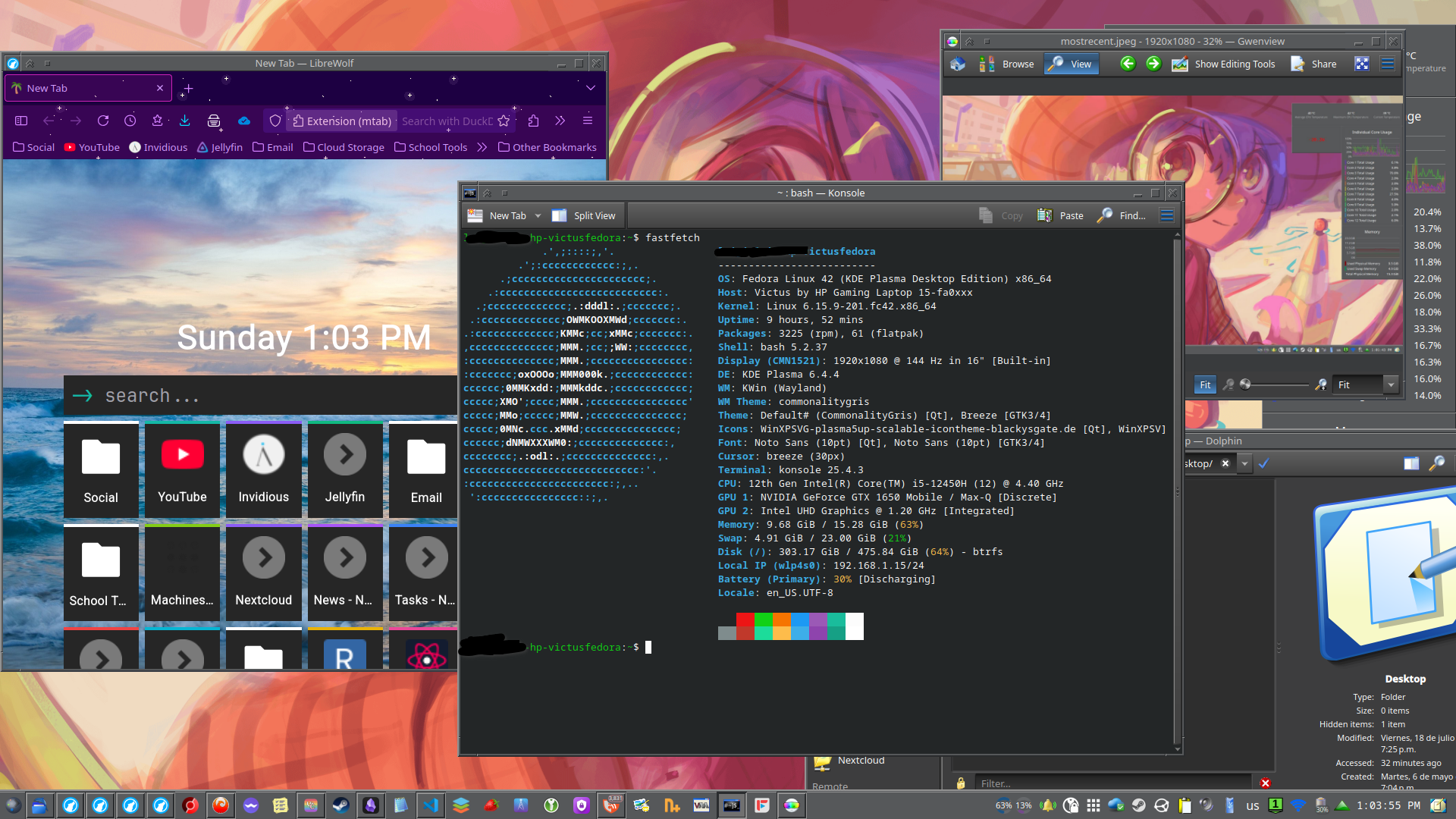
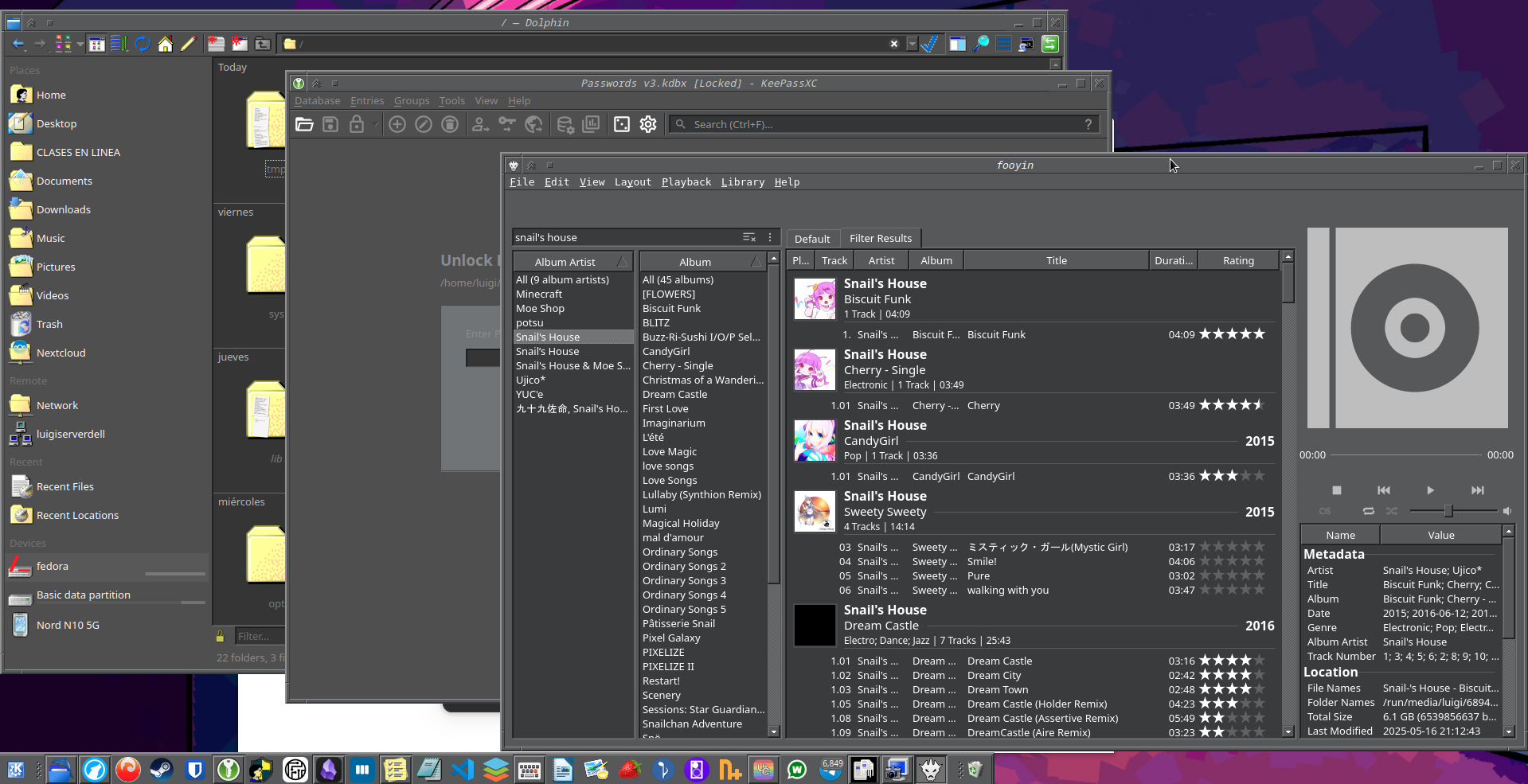
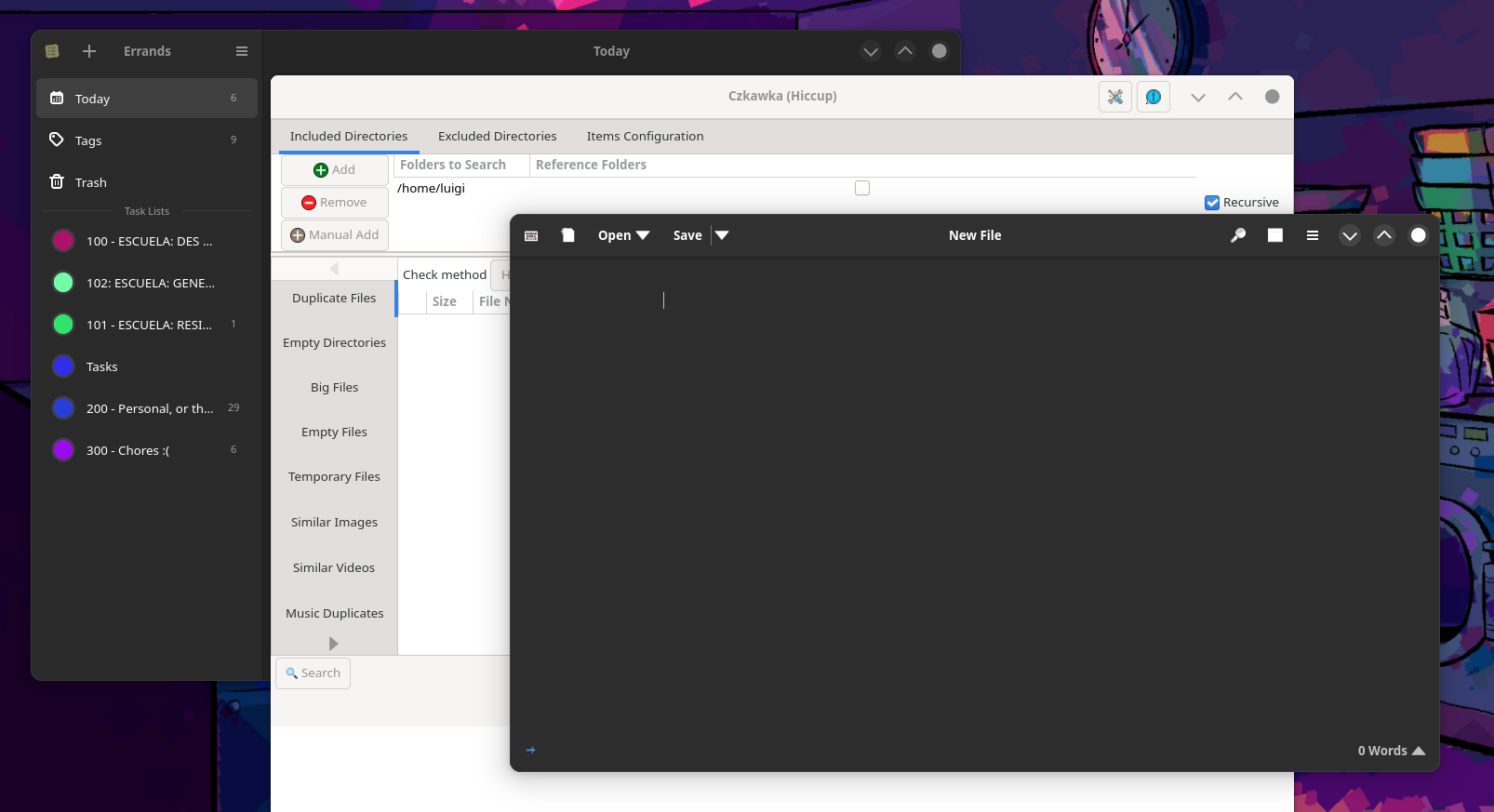
GTK apps never seem to theme properly according to the main KDE theme. I don’t think they are theme-able, like at all. It is clear that the GNOME devs will never ever add a global theming option in the same way Plasma has, so we pretty much have to deal with hacky workarounds to get theming working on KDE Plasma, and like, it sometimes works, but other times the app will simply ignore it, and you get an ugly unthemed GTK app show up and ruin your day. Or worse, when the GTK app tells you to go fuck yourself and it shows up in fucking light mode, which means that said app cares so little about you that it isn’t even willing to follow a setting that every other program follows automatically. Fucking hell.
And of course there is that ugly GTK file picker. I don’t like this file picker, like at all, and I much prefer to use the one KDE already has. Sometimes, you can ask the program to use the one that Plasma has (like in Firefox), but other times this is sadly not a thing that you can do at all. So now you are forced to deal with the ugly file picker, and the worst part? It often doesn’t follow the light/dark theme like at all, which makes it look even worse.
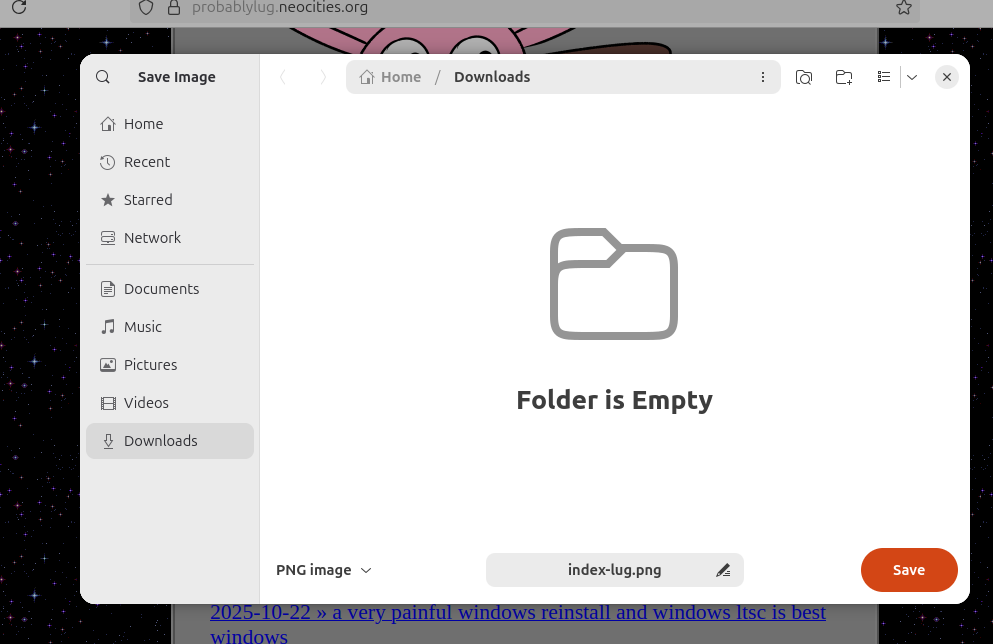
I think the biggest thing that bothers me regarding this is that there are developers purposefully trying to discourage distros (and to a lesser extent, users) from theming their apps. Case in point, is that Please Don’t Theme Our Apps open letter which was a bunch of devs complaining that distros and users were theming their apps and that they were ruining the “design language” of their apps. It is this awful “my way or the highway” thinking that the GNOME developers (and many of the developers that develop GTK apps) have that makes it very frustrating. And sure, maybe GNOME was never intended for me, but I am still forced to use GTK apps, because maybe the Qt based alternatives are sometimes not good enough. Or don’t exist at all. I guess the good thing, at least, is that I am actually able to theme apps and the entire operating system, which is a thing that Microsoft has continued to gut out from Windows after Windows 7.
and yet, i will miss things.
I will miss a lot of things that I found during my almost 5 months of nearly daily driving Linux. These range from some small things like having access to some neat command line utilities, to the software that is Linux only, and the nature of Linux being open source.
-
journald is a good way to get logs, compared to the hell that is Event Viewer on Windows. I can use
| grep 'thing'to find anything specific on there if I needed to. -
the command line on Linux is just great, compared to anything CMD on Windows.
-
theming on KDE Plasma is still something I’ll dearly miss. I miss having the ability to theme my OS like some old workstation from the 90s or early 2000s, or to make it look like Windows XP, or something else entirely. I miss being able to set up everything exactly the way I like it, and not the way Microsoft wants it.
-
I like how lightweight Linux is, even when running a relatively heavy Fedora KDE distro, it eats less RAM compared to full Windows 11.
-
i loved finding cool little software that did one thing and one thing very well on the repos. Browsing through the Flatpak store was a treat, and every time there was something new and cool to look at. This is how I learned about Mindustry, a tower defense game that apparently has a Linux build for free, lmao. I used to play that game for hours, and I should really get back to it ngl.
-
i really like the centralized package manager, and the fact that I barely needed to hunt down random pieces of software like on Windows. I liked having a package manager so much that I decided to use UniGet on Windows, which is really awesome and cool and neat to use.
-
I liked the feeling of not being constantly watched compared to Windows. I loved the fact that on Linux the only things that happen are the things I specifically allow to happen. I love the fact I just didn’t have to fuck around with scripts or registry tweaks to get a system that actually respects my privacy. It is just, boom, private right out of the box.
what to use, then? (and a sorta conclusion)
As I mentioned in earlier posts before, the thing that I ended up doing is simply going back to Windows, but not regular Windows, I decided to go with the LTSC versions. This somewhat offers me a slight peace of mind compared to stock Windows, since I won’t be having to deal with bullshit like forced updates to have features that I don’t want. It has no AI bullshit, no Copilot, no Recall, nothing of the sort. It is like Windows 7 if it never died (and it had a ugly modern UI refresh, lmao). And it should be easier to rip out any telemetry that may show up, thanks to the fact it is based on the Enterprise versions of Windows, which have a more granular control over stuff like telemetry and other Windows behaviors.
Will I use Linux again? Maybe. Like I said in that earlier post that i mentioned earlier, LTSC isn’t exactly designed for the average user. And there is a really good chance that even LTSC will get the coat of shit that Windows 11 Home and Pro have been getting. My time on Windows feels unstable, and even more so after the whole “30% of Windows code is now from AI” thing. I hear news every day about people encountering more issues with Windows because of this, and I worry one update will be the one that will nuke my drives, cause me BSODs, or some other dumb shit. And Microsoft still seems to be going full in the AI bullshit hype, so I suppose that doesn’t help matters either.
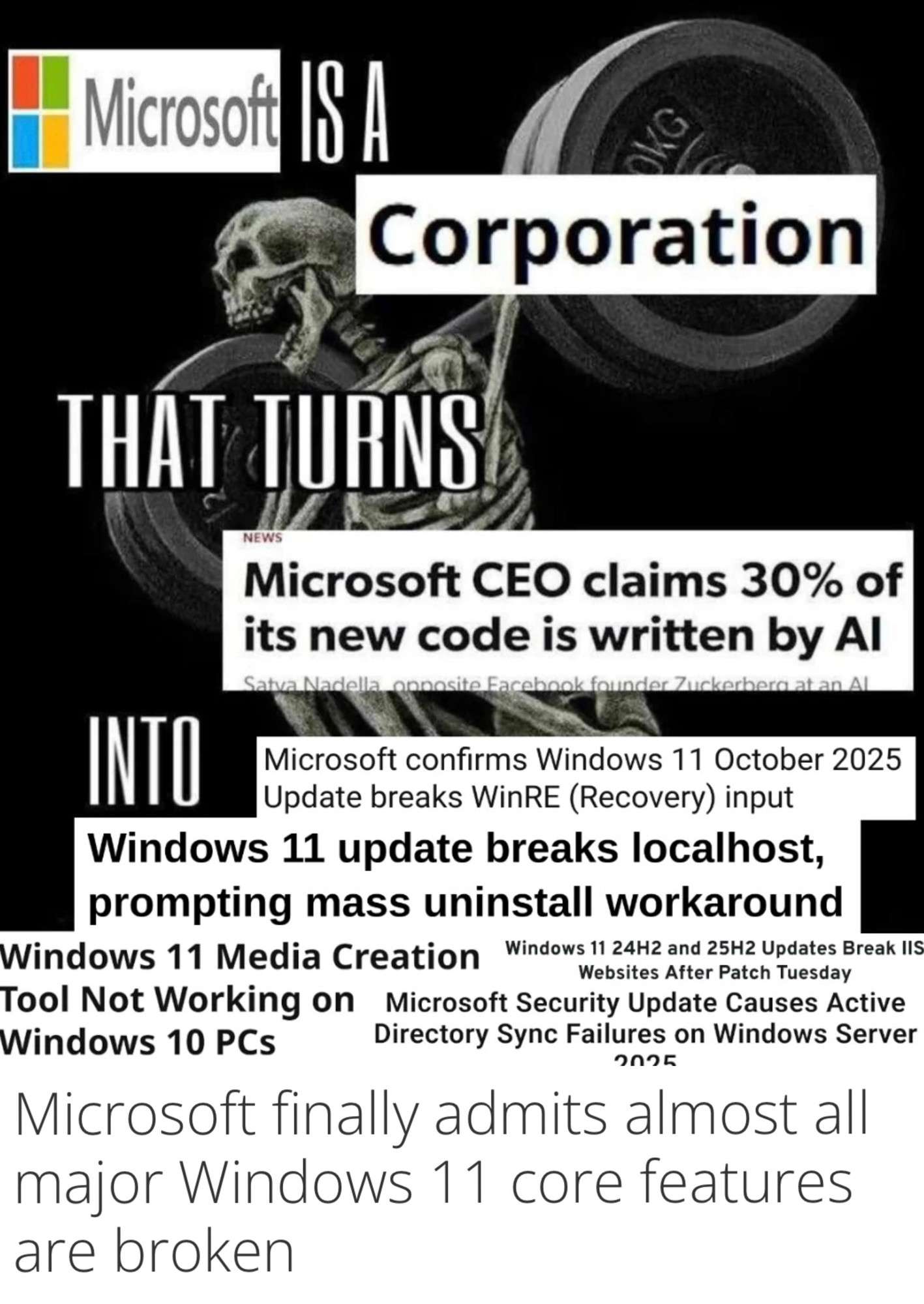
One should not mistake this rant as a hatred of Linux, by the contrary, I like Linux and the idea of having a computer with software that won’t spy on me and won’t sell me out to the highest bidder is very appealing to me. But sadly Linux isn’t there yet for me. And sure, maybe I picked wrong, maybe Fedora was a bad choice compared to Ubuntu or Debian, or maybe it is a fine choice after all. Maybe I am stupid for expecting my NVIDIA GPU to work on Wayland perhaps (and just, not wanting to touch X11 with a 20 meter pole, lmao). Maybe I should’ve done some stuff differently. But it doesn’t matter now, now I am back using Windows, and while Windows sucks (albeit less because I am using the LTSC version of it), I guess I have some peace of mind for now, while things are still hectic now, and maybe, when stuff finally calms down, I can go ahead and start fucking around with Linux again, and maybe finally figure out all the little issues I mentioned above earlier. So, I guess, see you later Linux, maybe in a year or two when I decide to try it on actual hardware again. Who knows. Maybe next time is the moment I finally switch over and kick Microsoft to the curve.
tangent 1: woah atproto, thank you for deleting my posts lmao
Recently I decided to migrate my Bluesky account over to Blacksky with the myatproto.social handle because there was some dumb changes that Bluesky was doing a couple months ago (like the age verification shit, the whole vague ass ToS shit) which made me want to at least have a semblance of a escape plan if shit did hit the fan sooner or later. Supposedly, Bluesky uses ATProto, which is a network that allows decentralization which means that one can run a server that runs a local ATProto network on it, and it can connect to the wider “ATmostphere” (ATProto’s version of the Fediverse). This is all well and good, until literally today, before posting this, I wanted to repost my older art again, since a lot of moots were doing the same, and found out literally most of my older posts are still there, but the images are corrupted or something because they only show nothing but gray. So uhh, cool, I guess.

I don’t know if I should go on a reposting spree. Maybe it would be fun, or not, who knows anymore. What I do know, is that I should probably make some sort of archive of sorts, maybe on this Neocities page, or maybe something selfhosted or whatever. And while I do have that Newgrounds page as a sorta informal archive, it isn’t the thing I want, to be honest.
page updates:
- 2025-11-22: page was created, may fix stuff later.
-
in fact, it is a single command away from running your system, with
rm -rf /, lmao.↩︎ -
I think it was something related to VLC, and i think it is most likely this issue here↩︎
-
Look at this and this, apparently this is fixed now but I can’t confirm it, but I was still having this issue a couple months ago.↩︎
-
By inconsistent, I’m referring to the fact that my KDE theming often did not extend to Flatpak apps.↩︎
-
real talk, i think this is a big issue, the fact that some programs on Flatpak struggle to access the keystore and encryption and then go ahead storing shit in plaintext, pain↩︎
-
god I remember the installing Steam incident during that using Linux challenge LTT made, which pretty much nuked the desktop for some reason↩︎
-
There are open source reimplementations, but like I feel these would break eventually with an update.↩︎
-
For these two, I tried OpenRBG but even that didn’t work, oh well.↩︎
-
Queue the dozens of videos from LTT complaining about modern standby, lmao.↩︎
-
According to this link here: “At the moment, desktop Linux falls behind alternatives like macOS or Android when it comes to certain security features.”↩︎
-
from some research that I was doing back then, apparently setting these two up are a pain in the ass, especially SELinux.↩︎
-
remember the multiple incidents of malware inside the AUR? Pepperidge Farm remembers…↩︎
-
it is also around this time that I learnt that LineageOS isn’t great at security either, considering the unlocked bootloader and the debug build thing which enables the ability to use ADB via USB, but like, the other alternative was to use the stock OS that hasn’t been updated since 2023, IDK which is worse LMAO. I been using LineageOS for a long while now, and I guess I am kinda used to it, I guess.↩︎